

Today marks the release of Nero 12.5. The basic premise of
Nero 12 remains the same – we provide you with the tools you need to burn,
edit, backup, rip convert, and play your media at the highest possible quality.
With this update, we’ve added a few new features to make Nero 12 even better.
With Nero 12.5, you will have:
If you go Platinum (and you really should), you get the added capability to:
Latest Device
Profiles - Nero Recode
Supporting the latest devices may sound simple, but more
and more devices are coming to market at an incredible rate. With Nero 12.5, we have added latest
device profile support to ensure best encoding results with just one click:
Intelligent Job Handling - Nero Recode
Speaking of devices, with our new Job to Device
feature, Nero Recode handles multiple videos within one job and jobs are
automatically grouped based on device profiles.
For example, Kindle Fire HD jobs will be listed as a group; iPhone 5 jobs
will be listed as a group, and so on. Then,
with the job options menu, you can edit, play, delete, and encode easily by
assigning one of these options to the group.
Improved Performance
- Nero Recode
Nero 12.5 takes even
better advantage of GPGPU hardware encoding in Nero Recode. The auto driver detection is set to default
to the GPGPU device, making the encoding process much faster. You will see the difference in speed and
quality when you use Nero Recode.
Match Music in your project - Nero Video
Nero 12.5 also
provides you with very beneficial features to speed up creation of projects
with music in Nero Video. With Fit Music to Project you can automatically match
the duration of your music to the duration of your project, including photos
and video clips. When appropriate, this
feature will use intelligent looping and auto fades to fill gaps in the music
track and make the project and music match perfectly. With the Fit Slideshow to
Music feature, you can automatically match the duration of your photo slideshow
to whatever music you’ve selected. These
features simplify the process of producing slideshows and videos, saving you
lots of valuable time while producing good results.
Improved Performance - Nero Video
Nero 12.5 also includes performance updates for editing and
exporting in Nero Video. With better memory usage you’ll have more tracks and
will be able to create longer videos – plus, you’ll notice better performance
in complex HD projects.
New Nero 12 Platinum
Features
Nero 12 Platinum users are
likely familiar with drag & drop nostalgic film effect templates for
getting that vintage film look. They
also like the fully customizable film effect in advanced mode that allows
personalization of nostalgic film moods. 
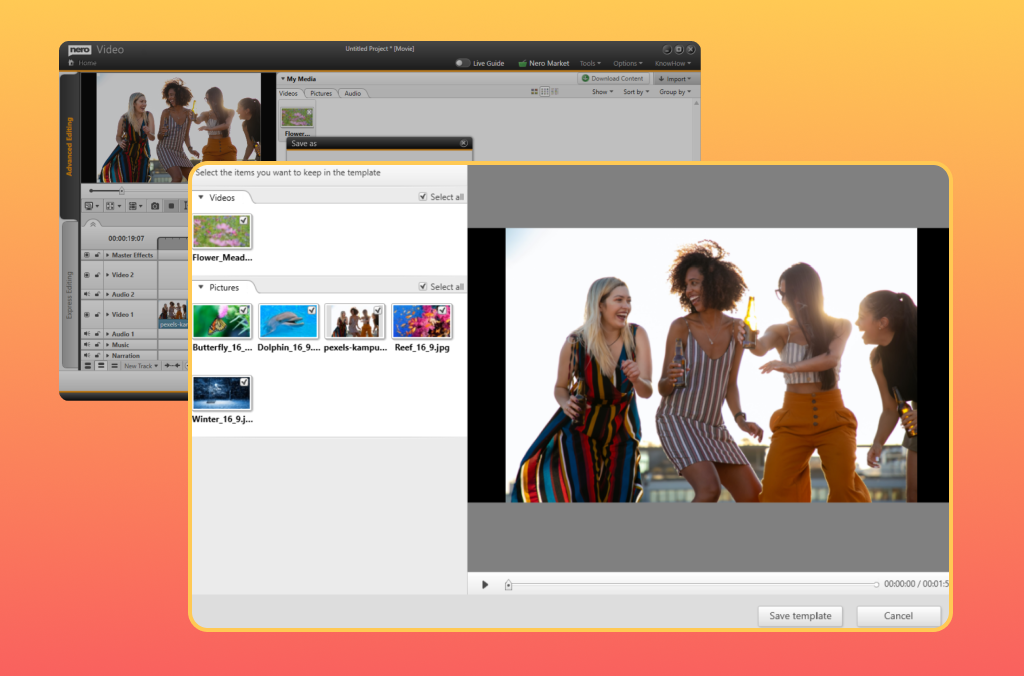
With Nero 12.5, now you will
be able to save your specific settings to use as reproducible personal templates
in Express Editing and Advanced Editing.
Likewise, when you use the Nero Video Stabilizer to correct shaky
footage in Advanced Editing, you can save and reuse your settings to apply to
other footage. Having these templates
close at hand will speed up your production process and result in professional
looking videos.

The Nero Suite team is happy to provide these enhancements for free to Nero 12 Standard and
Platinum users. Make sure you check out
the Nero.com website for more details on this as well as update information for
users of earlier versions of the Nero Suite.
Have fun with your media!
Related:
The Making of Nero 12
Get the latest update for Nero 12 Platinum
Get the latest update for Nero 12


Today marks the release of
the Nero 12 Update. The basic premise of
Nero 12 remains the same – we provide you with the tools you need to burn,
edit, backup, rip convert, and play your media at the highest possible quality.
With this update, we’ve added a few new features to make Nero 12 even better.
With the Nero 12 Update, you will have:
If you go Platinum (and you really should), you get the added capability to:
Latest Device
Profiles - Nero Recode
Supporting the latest devices may sound simple, but more
and more devices are coming to market at an incredible rate. With the Nero 12 Update, we have added latest
device profile support to ensure best encoding results with just one click:
Intelligent Job Handling - Nero Recode
Speaking of devices, with our new Job to Device
feature, Nero Recode handles multiple videos within one job and jobs are
automatically grouped based on device profiles.
For example, Kindle Fire HD jobs will be listed as a group; iPhone 5 jobs
will be listed as a group, and so on. Then,
with the job options menu, you can edit, play, delete, and encode easily by
assigning one of these options to the group.
Improved Performance
- Nero Recode
The Nero 12 Update takes even
better advantage of GPGPU hardware encoding in Nero Recode. The auto driver detection is set to default
to the GPGPU device, making the encoding process much faster. You will see the difference in speed and
quality when you use Nero Recode.
Match Music in your project - Nero Video
The Nero 12 Update also
provides you with very beneficial features to speed up creation of projects
with music in Nero Video. With Fit Music to Project you can automatically match
the duration of your music to the duration of your project, including photos
and video clips. When appropriate, this
feature will use intelligent looping and auto fades to fill gaps in the music
track and make the project and music match perfectly. With the Fit Slideshow to
Music feature, you can automatically match the duration of your photo slideshow
to whatever music you’ve selected. These
features simplify the process of producing slideshows and videos, saving you
lots of valuable time while producing good results.
Improved Performance - Nero Video
Nero 12 Update also includes performance updates for editing and
exporting in Nero Video. With better memory usage you’ll have more tracks and
will be able to create longer videos – plus, you’ll notice better performance
in complex HD projects.
New Nero 12 Platinum
Features
Nero 12 Platinum users are
likely familiar with drag & drop nostalgic film effect templates for
getting that vintage film look. They
also like the fully customizable film effect in advanced mode that allows
personalization of nostalgic film moods. 
With the Nero 12 Update, now you will
be able to save your specific settings to use as reproducible personal templates
in Express Editing and Advanced Editing.
Likewise, when you use the Nero Video Stabilizer to correct shaky
footage in Advanced Editing, you can save and reuse your settings to apply to
other footage. Having these templates
close at hand will speed up your production process and result in professional
looking videos.

The Nero Suite team is happy to provide these enhancements for free to Nero 12 Standard and
Platinum users. Make sure you check out
the Nero.com website for more details on this as well as update information for
users of earlier versions of the Nero Suite.
Have fun with your media!
Related:
The Making of Nero 12
Get the latest update for Nero 12 Platinum
Get the latest update for Nero 12


Have you ever wondered how the
development of our Nero Blu-ray Player works?
Today, you can get an exclusive peek into the Nero development world and learn about the work of our colleagues from the Blu-ray team and the challenges they face during the development of the Nero Blu-ray Player.
Just take a look at this picture, showing the real life incarnation of some specifications they need to fulfill.

Picture: Blu-ray Disc system
description - Part 3 (confidential) + various requirements
If you want to be surprised, just take a look into one of the many public PDFs describing just the requirements, for example, the UDF 2.6 specification: http://osta.org/specs/pdf/udf260.pdf published by www.usta.org, the Optical Storage Technology Association.
To develop a Blu-ray player, you not only have to plan the project, write the code, design the user interface, but also have to pass a very wide range of requirements from the Blu-ray Disc Association. This is a consortium of firms like Sony, Panasonic, Pioneer and others who develop the Blu-ray standard. The requirements also mean that you have to pass a lot of tests. The testing of the player is an immense expenditure as the team needs to fulfill about 6849 test cases on 32 test discs.
As Blu-ray Discs support Java software, you must also support Java™ software, and you need to develop and include interactive features on the Blu-ray Disc like menus or games, features which allow updates and streamed playback via the Internet, and much more. Not to forget that MPEG2, VC-1, H.264, JAVA, DOLBY, DTS standards are also involved.
The next big hurdle in developing a Blu-ray player is digital rights management and content protection. As you all know, it is forbidden to copy copyrighted content, and to ensure that copying is not possible, the Blu-ray Disc Association has strict requirements on this, so they have to be taken into account as well.
Finally, when all requirements are fulfilled, you can receive the certification from the Blu-ray Disc Association. If you fail in fulfilling any of the requirements, you are not allowed to offer the Blu-ray player or to print the Blu-ray logo on your package.
Having all these various tasks and requirements in mind, you can imagine that a lot of effort, time and, consequently, manpower is needed to get a seemingly simple player done. While there are Nero products which can be offered for free, Nero Blu-ray Player cannot be a free product because of all this work.
However, it is one of the most reasonably priced Blu-ray player applications available. In addition, Nero Blu-ray Player supports 3D playback and works with Microsoft Windows 8. This makes it perfect for enjoying Blu-ray Discs on a Windows 8 computer, as Windows 8 has no Blu-ray player included.
Now, it's time to meet the members of the Nero Blu-ray team who master all the challenges like heroes. They love what they do and they are always motivated to do their best, that means, to create the best product for you.
So a big "Thank you" to our dedicated Blu-ray team here at Nero

Picture: Tamara Dempe, Thomas Paasch, Peter Barth, Romané
Schaefer, Kai Scherrer, Frank Schmid,
Zöhre Kara Kayikci, Arne Gerner, Bernd Wissmeier, Daniel Bister (not on the
picture: Thomas Beller, Timo Steuerwald)
Related:
Keep Blu-Ray Playback with Windows 8
Get Nero 12 Platinum with Blu-ray playback


Codecs

Containers


Every so often customers ask us why remnants of Nero applications remain in their system registry even after they uninstall it. Here’s why that happens.
The most frequent calls our Customer Support team gets are from customers who mistakenly uninstalled their Nero software or who are unable to retrieve their serial number and need it again for some reason. In order to help people in these situations, our software leaves little bits of key information on your machine that make it easier to reinstall the applications at a later time.
So what doesn’t get uninstalled? For starters, we leave license related registry entries on the system, such as the actual serial number. Our installer can fetch this information from your system registry and automatically fill in that information should you ever need to re-install an application.
Other registry entries are related to file associations for playback or other user settings, such as if you change the path of a saved video project.
Finally, there are some Nero folders in common files and appdata, such as face tag data for photos which we do not remove. It would be incredibly time-consuming for you to have to re-create it all later, so we intend to save you time later by keeping that information intact.
In conclusion, the reason that some Nero applications remain on the system registry is to make it easier to reinstall.


The Making of Nero 12: Our Engineers Reminisce What’s so much better about Nero 12? That’s a good question with a bunch of good answers. And who better to explain it than the people who made Nero 12? We asked our engineers what they thought were the most significant developments in Nero 12.
Senior Product Manager Axel Braun, who spearheaded the creation of Nero 12, shared his thoughts: “The Nero Suite was often called bloated software. With Nero 12 we have made a big step into getting rid of this stigma. We streamlined the key applications, while still providing access to free tools that fully integrate into the suite. We added a special content installer which has improved the installation process.“

Oliver Schneider, Director-PC Business Line, likes the new features in Nero Video. He explained “We had real fun developing the video stabilizer and the slow and fast motion functionality in Nero Video. We have thrown in endless hours of private real footage and were amazed how much better and how much more exiting the stuff looks afterwards. Just put your camera somewhere and let it record a busy place like a street or a harbor for an hour and afterwards speed it up. It’s so interesting to see how things change quickly…”

Product Manager Patrick Kirchgäßner had a straight-forward answer to what he likes best about Nero 12: The streaming feature in Nero Kwik Media. When asked what aspects he had the most fun developing, he animatedly replied, “The Nero 12 version of Nero Kwik Media contains several improvements in the face recognition workflows. Testing and validating the new and changed features with all of our photos was really fun. The interaction with people rather than files and images makes for a much more valuable experience. The integration of Blu-ray 3D playback capability obviously required us watching lots of movies with all those different 3D technologies – not the worst thing to spend your office time with. :D”

Finally, our Chief Product Officer, Martin Stein, summed up what he loves about the new suite, “What’s been missing is an easy way to convert, customize and connect your content for all your different devices. Nero 12 fills that void.”
What do you like best about Nero 12? Tweet us @nerosolutions with your
comments.


Get some super spooky video with your smartphone this Halloween!

5 tips for
shooting video on Halloween night:


The Best New Features in Windows 8:


For our Nero 12 box design, we needed something fresh and awesome. Our design partner Glyphix more than delivered and we wanted to share with you how these boxes came to be. The design followed some core brand principles:

We asked Brad Wilder, the Creative Director at Glyphix what the best part of creating the new boxes was, and this is what he had to say:
Designing an entirely new look for a project as large and far-reaching as a Nero Suite launch was both exciting and daunting. It's pretty much impossible to narrow it down to one "best" part, a few highlights definitely stand out:
Be familiar
First would be the use of color-coding that builds to the N12 Suite Box. While the multi-colored stripes stand out extremely well on the shelf and in contrast to competitors, they also convey meaning as to the nature of the suite: a collection of color-coded, focused applications that when taken as a whole is far greater than the sum of its parts.
Be bold
While we were finalizing the design elements for the Suite box, we realized that the Platinum box had to shine equally well but in a completely different way. We accomplished that by pulling color back to an absolute minimum and relying on the boldness of the stripes and the chrome reflectivity of the box base to show that it was (in features) a step above the dynamism of the Suite.
Be contemporary
Also along the lines of box material, the Nero12 packaging was designed from day one to leverage unusual printing processes as core design elements. In addition to the metallic chrome base of the Platinum box, we all spent a great deal of time planning exactly how the layering of the design in print would overlay that chrome base so that each stripe would dull the chrome to create depth and richness. For the Suite box, we added a gloss coating to random stripes to give that same sense of depth and richness of the Platinum box but in a new and unexpected way. Topping that off with the Nero logo and Suite version being printed in a large and very bold flat white, and the contrast creates what we believe is the strongest Nero package design yet.
Be clear
This departure from previous Suite versions was one that required tremendous exploration, discussion and iterative steps by the Glyphix/Nero team to make sure that not only was the finished product visually exciting, but that it also conveyed the breadth and depth of the Nero Suite of applications itself. To that end, we made sure that the prospective buyer could quickly understand both the scope of the software and also the benefits and differences from both competition and the previous Nero Suite. This included taking easily recognized benefit logos and moving them from their usual partially hidden location of software box backs to the front and center of Nero 12 packaging as well as stating clear use benefits along with those feature logos.
Be simple
Combining all of the above and the result is a family of packaging that ties together seamlessly, yet allows each individual box (whether virtual or real) to shine on its own.
Be differentiated
The angled stripes of varying density, saturation, color and size convey speed and synergy while looking very different from any other box on the shelf.